How to take a passport photo at home
The exact UK and US measurements, the two setup mistakes that cause most rejections, and the greyscale check that catches a bad background.
Passport photos taken at home are accepted by both the UK and US authorities, provided they meet the published measurements rather than merely looking correct. The rules that fail applications are geometric: head height, background evenness and shadow. Stand two metres from a plain light wall, face a window, and have somebody else hold the camera. Measure the head before submitting, because the wrong head size is the most common reason an application is delayed.
The steps
- 1Find a plain, light wall and stand a metre off it — Separation from the wall is what stops your own shadow falling on it. A hallway in daylight beats a bedroom with a lamp.
- 2Face a window and turn the ceiling light off — Front light from a window removes eye-socket shadows. Overhead and side lighting are the two most common causes of an uneven face.
- 3Have someone else shoot from about two metres, framing loosely — Distance removes the lens distortion that a selfie introduces. Leave room around the head, because cropping later is free and recovering hair is not.
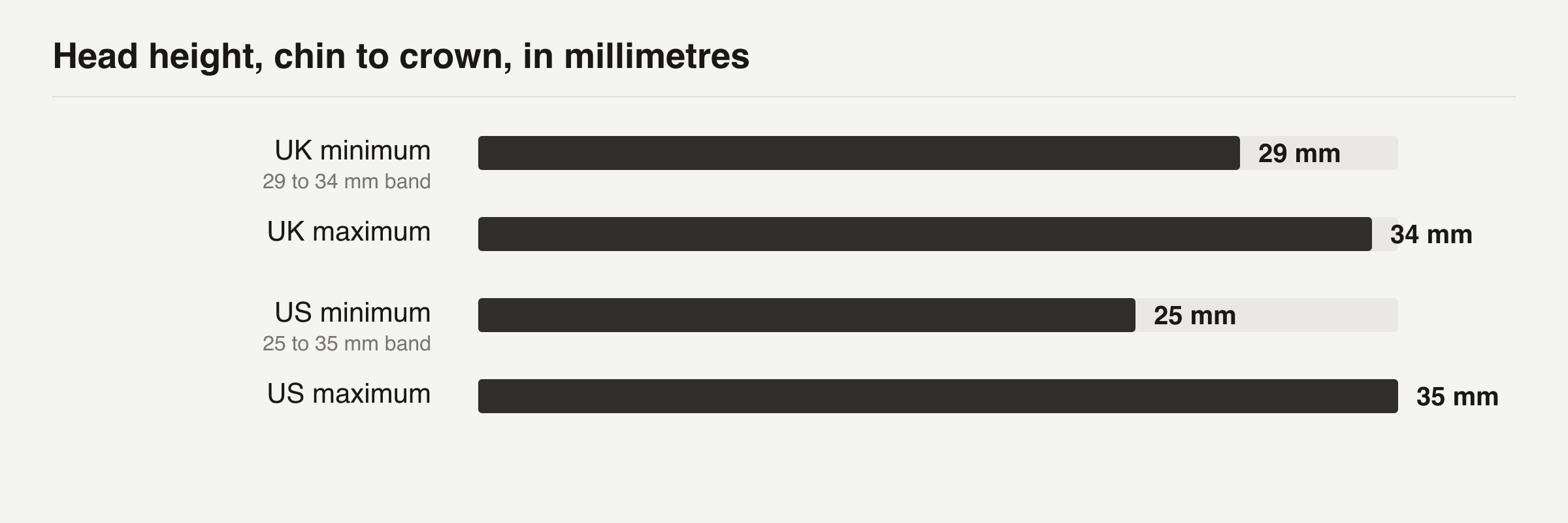
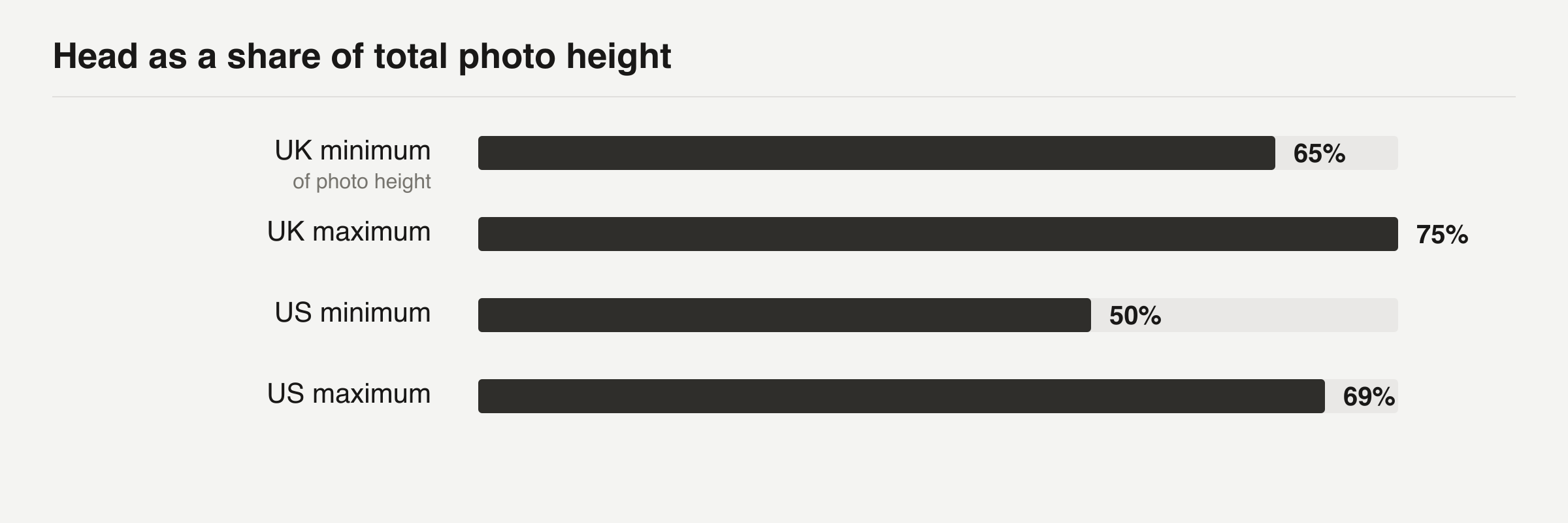
- 4Measure the head from chin to crown before you submit — 29 to 34 mm for the UK, 25 to 35 mm for the US. As a proportion that is roughly 65 to 75% and 50 to 69% of the photo height.
- 5Check the background in greyscale — Converting a copy to greyscale removes the colour cue your eye uses to discount a gradient, and makes an uneven wall obvious.
What actually gets a passport photo rejected?
Unacceptable photos are the single biggest cause of delay on a US passport application. The State Department puts that sentence at the top of its own requirements page, above every other piece of advice, which tells you how routine the problem is.
The reasons are almost never artistic. A photo fails because a measurement is wrong, because the wall behind the head is not evenly lit, or because the person in it did something the guidance forbids. Nobody is judging whether you look good.
That matters because it changes what you should be careful about. Most people taking a photo at home worry about their expression and their hair, then pay no attention to the two things actually being checked: how large the head is inside the frame, and how even the background is. A flattering photo with a 40 mm head gets rejected. An unflattering one with a 33 mm head sails through.
The rejections cluster into five causes, and four of them are fixable before you press the shutter:
- Head too large or too small in the frame, which is a distance problem
- Shadow on the background, which is a distance problem too
- Uneven light on the face, usually from an overhead bulb
- Glasses, head coverings or an open mouth, which are rule problems
- Digital alteration, which is usually an app doing it without telling you
Cropping and resizing are fine. Retouching is not. Both authorities require
the original unedited image, so a beauty filter applied by default turns an
acceptable photo into a rejectable one.
What are the exact measurements for the UK and the US?
The UK and the US each publish precise numbers, and the numbers are different, so the first thing to settle is which passport you are applying for. One image cannot serve both. The UK wants a rectangle and the US wants a square.
The head measurement is the one worth internalising, because it is the number you cannot fix afterwards without recropping and losing resolution.
Millimetres are awkward to check in an image editor, which reports pixels. The same rule expressed as a proportion of the frame is easier to verify, and it is the form worth remembering:
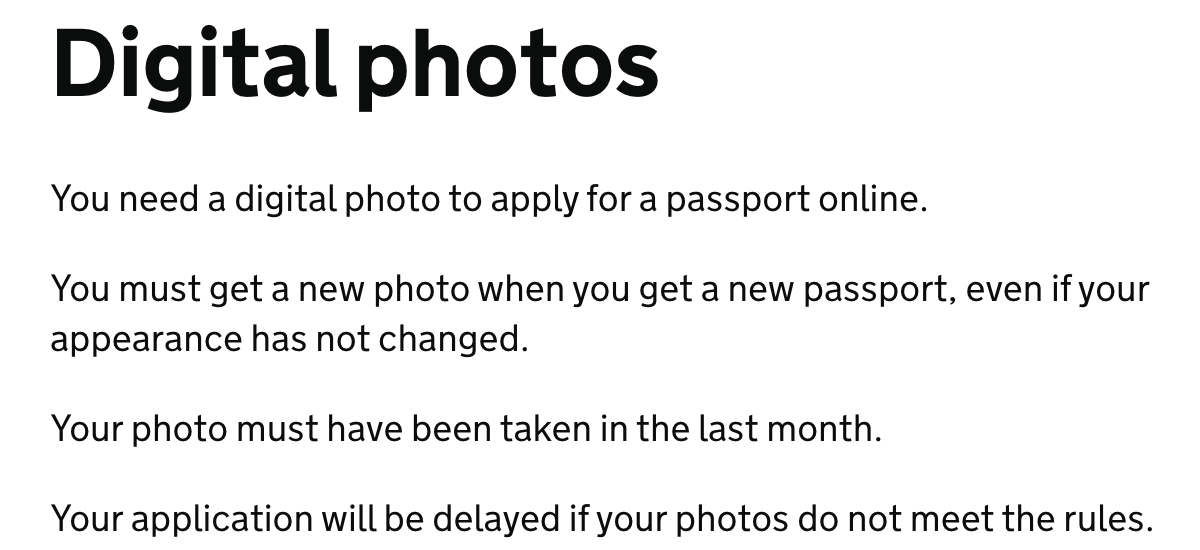
Two rules are easy to miss because they concern time rather than geometry. A UK photo must have been taken in the last month, and you need a new one for every new passport even if your appearance has not changed at all. The US allows six months. Reusing the shot from your last renewal is a very common and very avoidable rejection.
How do you set up the shot at home?
Stand about two metres from a plain light wall and have somebody else take the photo. Distance is doing something specific. A phone held at arm's length enlarges whatever sits nearest the lens, which is your nose, and the resulting face is subtly the wrong shape against a biometric check. Backing off removes that distortion completely.
The UK is explicit that somebody else must take it. A selfie is not accepted.
Light the face from the front. A window you are facing is the best light most homes contain, and it costs nothing. Overhead lighting is the usual culprit behind dark eye sockets, and a lamp off to one side gives you one bright cheek and one dark one. If the room only has a ceiling light, switch it off and use the window instead.
Frame loosely. Leave plenty of room around the head, because cropping in later is free and recovering the top of somebody's hair is impossible. The UK application crops your uploaded image to the biometric ratio during upload, so it needs the full head and shoulders to work from. A tight shot gives the software nothing to trim.
A short checklist for the two minutes before you shoot:
- Plain wall, and stand a metre clear of it
- Face a window, ceiling light off
- Camera at eye level, about two metres away
- Neutral expression, mouth closed, eyes open and visible
- Nothing on your head unless it is religious or medical
- Take ten frames, not one
Ten frames costs nothing and gives you options. Blinks and half-expressions are far more common than people expect.
Why does the background fail more often than the face?
Backgrounds fail because they become a gradient, not because they are the wrong colour. Standing close to a wall throws a soft shadow onto it, and that shadow reads as a tone change across a surface that is required to be even.
Nobody notices it in the room. Human vision discounts illumination automatically, which is exactly what the checking software does not do. Your eye sees a white wall; the software sees a wall that is 12% darker on the left.
The fix costs nothing. Move further from the wall. A metre of separation lets the light wrap around you and the shadow falls outside the frame entirely. A plain wall in a well lit hallway usually works better than a bedroom wall with a lamp near it, because hallways tend to have light from more than one direction.
Do not reach for a pure white wall if you are applying in the UK. GOV.UK asks for a plain light-coloured background, and pure white leaves nothing separating fair hair from the wall behind it. Light grey or cream is more forgiving and easier to light evenly.
Should you use a passport photo app or do it yourself?
Use one for the arithmetic and be careful about everything else it does.
The genuinely useful thing these apps provide is measurement. They compute head height in millimetres against the published band and output the exact pixel dimensions, which is tedious by hand and is the part most likely to be wrong. If you are cropping manually in an image editor, you are doing that arithmetic yourself and you will probably get it slightly wrong the first time.
The dangerous thing they provide is retouching, and it is often on by default. The State Department asks for the original unedited photo with no filters or digital changes. GOV.UK says a photo must not be digitally altered. An app that smooths skin or brightens eyes has changed your photo into one that can be rejected, and it will not warn you.
Prefer a tool that shows you the measured head height over one that only shows a green tick. A number you can check yourself is worth more than a claim you cannot, which is the same reason the worked examples in our documentation end every pipeline with a measurement rather than an assertion of success.
How do you check the photo before you submit it?
Measure the head, then look at the background on something other than the phone you shot it with. Two checks, in that order, and both take under a minute.
For the head, open the image and measure from the bottom of the chin to the top of the skull. Not the top of the hair. Compare against the table above. If your tool reports pixels rather than millimetres, divide the head height by the total image height and check the percentage instead: roughly 65 to 75% for the UK, 50 to 69% for the US.
For the background, convert a copy to greyscale and look at it again. Greyscale is the useful trick here. Removing the colour information strips out the cue your eye was using to compensate, and a gradient that was invisible in the original becomes obvious. If you can see the wall getting darker towards one edge, retake the photo. Do not try to even it out in an editor, because an edited background is an altered photo.
A final pass, in order of how often each one catches something:
- 1Head height inside the published band
- 2Background even, checked in greyscale
- 3Both eyes visible, no hair across them
- 4Mouth closed, expression neutral
- 5No shadow under the chin or across one cheek
- 6File size and pixel dimensions inside the limits
What does doing it yourself actually save?
A high street photo booth or shop in the UK typically charges somewhere between £5 and £15, and a US acceptance facility or pharmacy is usually in the $15 to $20 range. Doing it at home costs nothing beyond the time.
The saving is real but small, and it is not the main reason to do it yourself. The better reasons are that you can take fifty frames instead of two, that you can retake it the same evening if the check fails, and that you keep the original file for the next application. A shop hands you prints or a code, and if the photo is rejected you are going back.
Against that, weigh what a rejection costs. A delayed passport application is measured in weeks, and if you are inside a travel window that is the expensive outcome rather than the £10.
When should you just pay somebody?
Pay somebody when the subject is a baby, when the applicant cannot easily be positioned, or when you have already been rejected once.
Babies are genuinely hard. The same head height and open-eye rules apply, and a baby will not hold a neutral expression against a plain background on request. Both authorities publish separate guidance for infants for exactly this reason. A shop that does this daily has a setup for it.
The second case is anybody who cannot stand two metres from a wall unaided, or who needs a head covering positioned carefully for religious or medical reasons. GOV.UK publishes help for disabled applicants, and using it is faster than iterating at home.
The third case is the honest one. If your photo has already been rejected and you do not know which rule it broke, the diagnostic loop is slow and each cycle costs weeks. Paying once to get a compliant image is the cheaper path, and you still keep the digital file afterwards.
For the neighbouring problems, the other image guides cover the same territory: a measurable output, checked before it is sent, rather than a result that looks about right.
Questions
Can I take the photo as a selfie?
No for a UK application, which requires somebody else to take it, and it is a bad idea everywhere else. A camera at arm's length enlarges the nose and changes the shape of the face enough to matter against a biometric check.
Can I smile in a passport photo?
The US allows a smile as long as your mouth stays closed and your expression is neutral. GOV.UK asks for a plain expression with the mouth closed. Neither accepts an open-mouth smile.
Can I wear glasses?
The US has not accepted photos with glasses since November 2016. GOV.UK asks you not to wear them unless you have to, and never sunglasses or tinted lenses.
Does a photo app count as digitally altering the photo?
Cropping and resizing are fine. Retouching is not. Both authorities require the original unedited image, so any skin smoothing or brightening applied by default makes the photo rejectable.
Sources
- Get a passport photo: digital photo requirements — GOV.UK · checked 5 Sep 2026
- Passport Photos: size, position and requirements — US Department of State · checked 5 Sep 2026
- Uploading a Digital Photo for online renewal — US Department of State · checked 5 Sep 2026
- Passport photos for babies and children — GOV.UK · checked 5 Sep 2026
/blog/passport-photo-at-home.md — this page, for the agent reading it on your behalf