How to add subtitles to a video
Why automatic captions feel wrong even when the words are right, the reading-speed limits broadcasters publish, and the muted-playback check.
Automatic subtitles fail at cueing rather than at transcription. Splitting a transcript into readable cues is a separate problem from recognising the words, and most tools barely attempt it. Aim for the published broadcast limits: two lines per cue, 42 characters per line, and a reading speed under 20 characters per second. Never let a cue straddle a cut. Then watch the video once with the sound off, which is the check that finds everything else.
The steps
- 1Generate the transcript with any competent tool — Accuracy differences between the mainstream engines are small on clean audio. Do not spend the budget here.
- 2Re-split the cues on grammar rather than on pauses — Break at natural grammatical points and keep the two lines close to equal length. This is the step that makes subtitles feel human.
- 3Bring every cue inside the reading-speed limit — Under 20 characters per second for English adult content. When speech is too fast, shorten the text rather than shortening the cue.
- 4Align cues to shot changes — Cue in on the cut when speech starts near it, and out before the cut when speech ends near it. Twenty minutes on a long video, and the most noticeable single improvement.
- 5Watch it once with the sound off — With no audio your brain cannot fill the gaps, so you read exactly what a viewer reads. Cueing faults become obvious in thirty seconds.
Why do automatic subtitles feel wrong even when the words are right?
Automatic subtitles fail at cueing rather than at transcription. Turning speech into text is close to solved for clean audio. Deciding where one subtitle ends and the next begins, and how long each stays on screen, is a separate problem that most consumer tools barely attempt.
What you get is a transcript with timestamps. Accurate, and tiring to read.
The difference shows up in three specific ways, and once you know them you cannot unsee them:
- Cues change mid-sentence, because the tool split on a pause rather than on a grammatical break
- Cues flash past, because they were given exactly as long as the speech took, which is not long enough to read
- Cues straddle a cut, so the picture changes while the text stays, forcing the eye to re-read a line it had already started
None of that improves with a better transcription model. Paying for a more accurate engine buys you fewer typos and identical cueing, which is why the result still feels off after you upgrade.
What are the actual rules broadcasters use?
Broadcasters publish their standards openly, and the numbers are specific enough to check a file against. Two sets are worth knowing: the BBC's subtitle guidelines and Netflix's timed text style guide.

The BBC recommends a maximum of two lines for landscape or square video and puts the target reading rate at 160 to 180 words per minute. Netflix works in characters per second instead, capping English adult content at 20 and children's programmes at 17.
Reading speed is worth understanding rather than merely obeying. Netflix documents that events timed too fast are among the most common reasons a subtitle file fails quality control. Speed is the rule that gets broken first and noticed last, because a cue that is 20% too fast looks completely normal to somebody who already knows what was said.
Here is what those limits mean in practice for a full two-line cue:
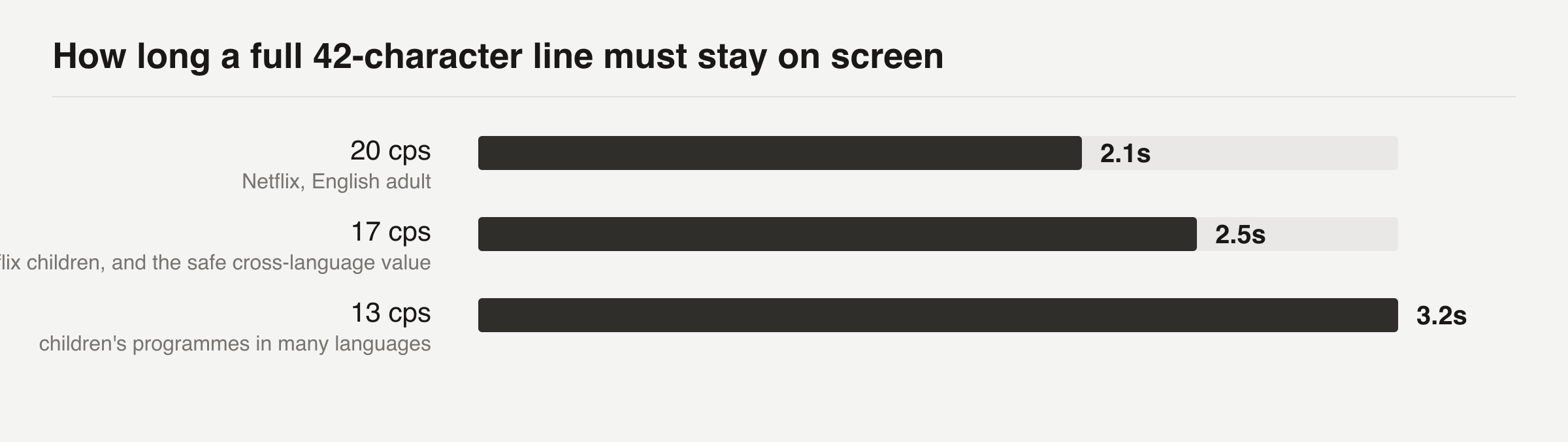
If you serve several languages from one pipeline, 17 is the value that passes almost everywhere. Building to 20 means rebuilding when you add a second language.
How should a cue be split?
Split on grammar, not on silence. A break in the middle of a noun phrase, such as the new / accounting system, makes a reader hold an incomplete idea across a screen change. That cost is invisible in a transcript and obvious on video. Netflix asks for breaks at natural grammatical points, with the two lines kept as close to equal length as possible.
Most automatic tools split on pauses, because pauses are trivial to detect and grammar is not. That single implementation choice explains most of what feels wrong about machine subtitles.
It is also why a quick manual pass over cue boundaries improves a file far more than switching engines does. Twenty minutes of merging and splitting will beat any amount of money spent on transcription accuracy.
When speech is too fast to fit inside the reading-speed limit, shorten the text rather than speeding up the cue. Netflix's guidance is to reduce, delete and condense. The exception is SDH captions, which stay close to the audio, because a viewer who cannot hear the soundtrack is relying on the text to be faithful rather than readable.
Why do cues need to respect shot changes?
A subtitle that changes at a different moment from the picture makes the viewer process two changes instead of one. The BBC states it plainly: it is likely to be less tiring for the viewer if shot changes and subtitle changes occur at the same time. Netflix requires timing to match shot changes outright.
Reading is the reason. The eye treats a cut as a signal to re-scan the frame,
so text appearing just after a cut gets read from the beginning again even
when it was already on screen.
Aligning the two means the re-scan and the new text coincide, and the viewer reads the line once instead of one and a half times. Across a forty-minute video that difference is the gap between subtitles you stop noticing and subtitles you switch off.
In practice this means cueing in on the cut when speech starts within a few frames of it, and cueing out before the cut when speech ends near one. Almost no consumer tool does this automatically. Doing it by hand on the handful of cues that fall near cuts is usually twenty minutes of work on a long video, and it is the single most noticeable improvement available.
Which tool should you actually use?
Choose on what you can fix rather than on transcription accuracy, because the accuracy differences between mainstream engines are small and the editing differences are enormous.
If the video is going to YouTube and nowhere else, YouTube's own automatic captions plus its caption editor is the shortest path. The transcript costs nothing and the editor lets you correct both words and timings in the same place. The catch is that you end up with a setting inside one platform rather than a file you own.
If the video is going anywhere else, export an SRT or VTT from a dedicated tool. What is worth paying for is unglamorous:
- A cue editor that shows reading speed per cue, so you can see which ones fail
- Merge and split without retyping the text
- Waveform and shot-change markers on the timeline
- Export to a plain subtitle format, not only burned-in video
- Batch export when you have more than one language
Burned-in captions with animated words are a styling choice, and they are also a decision you cannot undo. A viewer who wants subtitles off cannot turn them off, a translator cannot work from them, and a search engine cannot read them at all. Burn them in only when the platform plays muted by default and offers no caption track.
How do you check a subtitle file before publishing?
Read the file as a file, then watch the video once with the sound off. Two checks, and the second finds what the first cannot.
The file check is arithmetic, and it is fast. Open the SRT and look for four mechanical conditions:
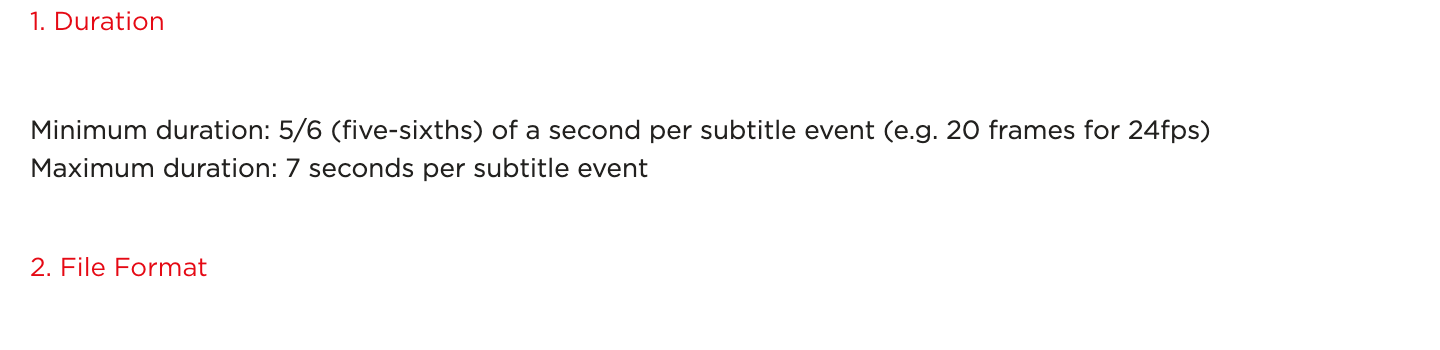
- 1Cues shorter than 5/6 of a second
- 2Cues longer than 7 seconds
- 3Lines longer than 42 characters
- 4Any cue with three lines
Those four account for most rejections against a published standard. Several subtitle editors flag them automatically. A spreadsheet will do it if yours does not, and the whole check takes a couple of minutes.
Watching it muted is the check that finds cueing problems. With no audio your brain has nothing to fill the gaps with, so you read exactly what a deaf viewer reads. Cues that straddle a cut, break mid-phrase or vanish too early become obvious within thirty seconds, and they are completely invisible when you can hear the words being said.
That pattern, verifying an artifact with a different instrument from the one that produced it, is the same thing that makes a transcript trustworthy. It is also why every pipeline in our worked examples ends with a measurement rather than an export.
What changes when you add a second language?
Translation breaks the timing you just fixed, and that surprises people every time. The same sentence in German runs roughly a third longer than in English, and Spanish and French are not far behind. A cue that sat comfortably at 18 characters per second in English arrives at 24 in translation and fails the reading-speed limit while the timings look untouched.
Two ways to handle it, and they cost different things:
- Translate to the cue. Give the translator the character budget for each cue, derived from its duration and the target reading speed, and let them condense to fit. Costs more per cue and preserves the timing exactly.
- Retime after translating. Translate freely, then adjust cue boundaries to suit the new text. Cheaper per cue and breaks the alignment with shot changes, which then has to be redone.
The first approach is what broadcast subtitling actually does, and the reason is that shot alignment is expensive to rebuild and character budgets are cheap to compute. Netflix's own guidance to reduce, delete and condense is written for exactly this situation.
One practical consequence for the original English file: build it at 17 characters per second rather than 20 if you know translation is coming. The English will feel slightly generous and every downstream language will fit without retiming. Building at 20 and translating later means doing the shot alignment twice.
Right-to-left languages add a separate set of rules around punctuation and line order, and machine translation handles them poorly. That is the one case where paying a human translator is not optional.
When are automatic subtitles good enough on their own?
Automatic captions with no editing pass are fine for internal video, for searchable archives, and for anything nobody is going to sit and watch end to end. Getting 92% of the words right with mediocre cueing is a great deal when the alternative is nothing.
They are not good enough for anything customer-facing, for anything with proper nouns in it, or for anything you would be embarrassed to have quoted back. The failure mode is specific: names come out wrong, and a wrong name in a caption is more visible than a wrong name in a transcript because it sits under the face of the person saying it.
A rough decision rule that has held up for us:
The middle row is where most people get it wrong. A sixty-second clip feels too short to bother editing, and it is also the format most likely to be watched muted, which means the subtitles are doing all the work.
Questions
What reading speed should I aim for?
The BBC targets 160 to 180 words per minute. Netflix caps English adult content at 20 characters per second and children's programmes at 17. If you serve several languages from one pipeline, 17 is the value that passes almost everywhere.
Should I burn subtitles into the video or ship a separate file?
Ship a file unless the platform cannot take one. Burned-in captions cannot be turned off, cannot be translated, and cannot be read by a search engine. Burn them in only when the platform plays muted by default and offers no caption track.
Is SRT or VTT better?
SRT is more widely accepted and carries no styling. VTT supports positioning and basic styling and is the web standard. Export SRT unless you need a cue placed away from the bottom of the frame.
Do subtitles help with search?
A separate caption file is machine-readable text tied to your video, so yes, in the sense that it can be indexed and quoted. Burned-in pixels cannot be read at all, which is the practical argument for a sidecar file over styled captions.
Sources
- Subtitle Guidelines, version 1.2.5 — BBC · checked 5 Sep 2026
- Timed Text Style Guide: General Requirements — Netflix Partner Help Center · checked 5 Sep 2026
- English (USA) Timed Text Style Guide — Netflix Partner Help Center · checked 5 Sep 2026
/blog/add-subtitles-to-a-video.md — this page, for the agent reading it on your behalf